GYROTOUCH
Tilt to control, remap buttons & auto-tap anywhere — overlay for every app.
See It In Action
Watch how GyroTouch transforms your mobile gaming with precision gyroscope control.
Powerful Features
Everything you need to take full control of how you interact with any app.
Gyroscope Aiming
Tilt your device to aim with adjustable sensitivity and dead zone filtering for precise control.
Auto-Tap Transfer
Convert finger holds into rapid repeated taps at any location. Semi-auto to full-auto instantly.
Input Transfer
Remap any button to wherever your thumb naturally rests. Up to 10 transfer pairs per layout.
Multiple Layouts
Save up to 5 configurations. Switch between layouts instantly with one tap from the overlay.
No Root Required
Self-contained setup via wireless debugging. 2-minute wizard, no PC or external apps needed.
8 Languages
English, Turkish, Spanish, Arabic, Chinese, Korean, Japanese, Russian with auto-detection.
Universal Compatibility
Works with any app on Android 11+. No game-specific configuration or modifications needed.
Fully Customizable
Drag, resize, recolor, reshape. 9 colors, adjustable opacity, square/circle/rectangle shapes.
Three Tools, Total Control
GyroTouch gives you three powerful tools to take full control of how you interact with any app on your phone.
Tilt to Control
Turn your phone's built-in gyroscope into a motion controller. Place a zone on your screen, and GyroTouch converts your phone's tilting motion into smooth touch movements. Your real finger touches keep working everywhere else simultaneously.
- Adjustable sensitivity with separate X and Y axes
- Dead zone filter to ignore small hand tremors
- Invert either axis to match your preferred direction
- Smart auto-pause: finger enters zone, gyro pauses instantly; lift and gyro resumes seamlessly
Remap Any Button
Move any on-screen button to wherever you want. Place a green sender zone where your thumb naturally rests, and a red receiver zone over the button you want to press. Instead of stretching across the screen, bring the button to you.
- Up to 10 remapping pairs per layout
- 1:1 position mapping — edge-accurate precision
- Square, circle, or rectangle shapes
- Independent sizing and opacity for sender and receiver
Auto-Tap Anywhere
Hold your finger in one spot and get rapid repeated taps at another spot on screen. As long as your finger stays on the sender, taps keep going at the receiver. Save your fingers and let GyroTouch handle it.
- Up to 10 auto-tap pairs per layout
- Adjustable tap speed (duration and interval)
- Randomize timing and position for natural-feeling input
- Taps complete cleanly — no stuck or phantom touches
Easy Setup, Full Control
A step-by-step wizard walks you through everything in about 2 minutes with brand-specific instructions for Samsung, Xiaomi, Pixel, OnePlus, OPPO, Vivo, Huawei, and more. After the first setup, the app connects automatically every time.
- Drag to reposition, pinch to resize the gyro zone
- 9 area colors with 0-100% opacity control
- Compact control panel with settings and pause
- All positions and settings saved automatically
App Screenshots
Clean, intuitive interface designed for speed and ease of use.
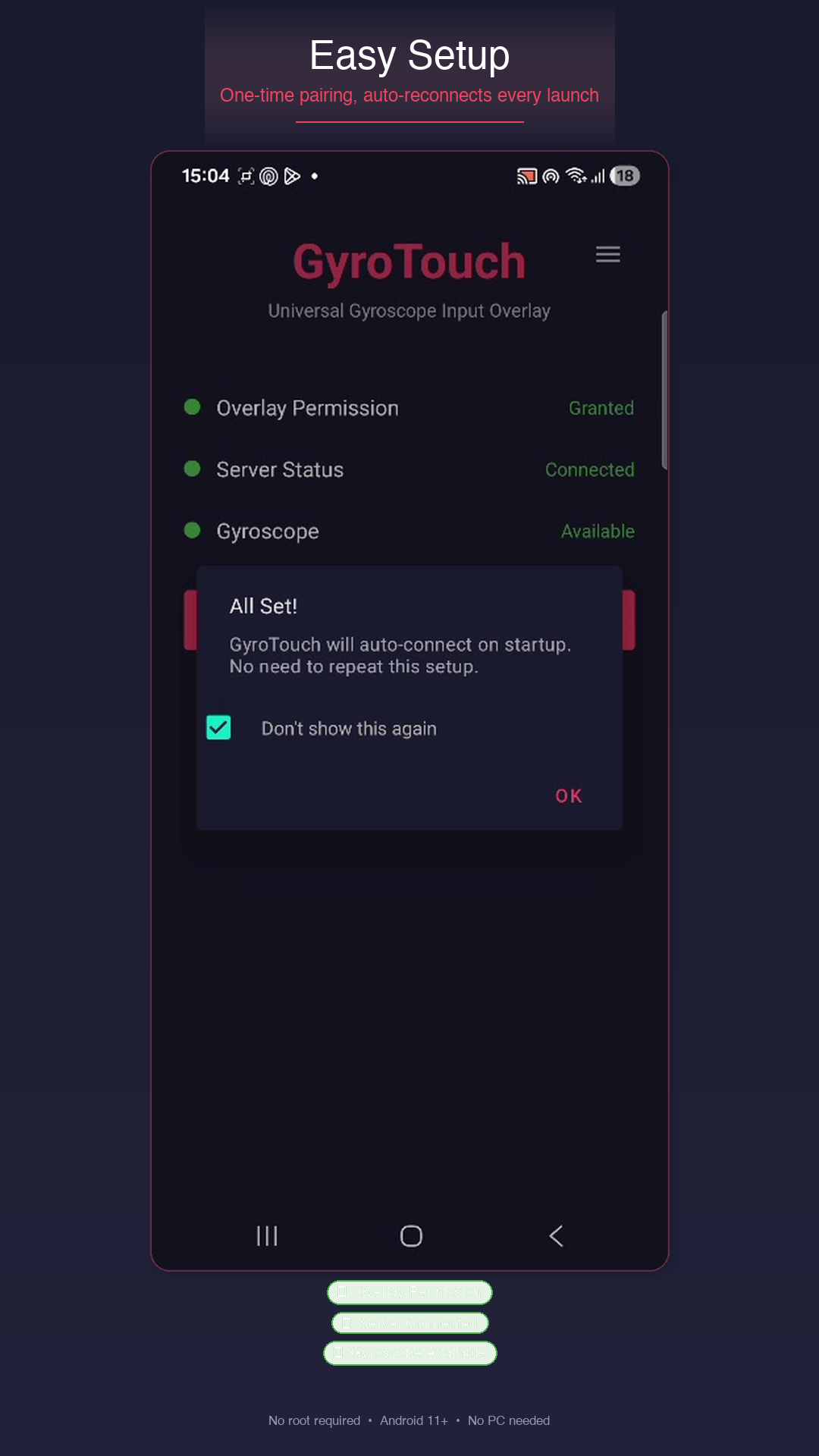
Easy Setup
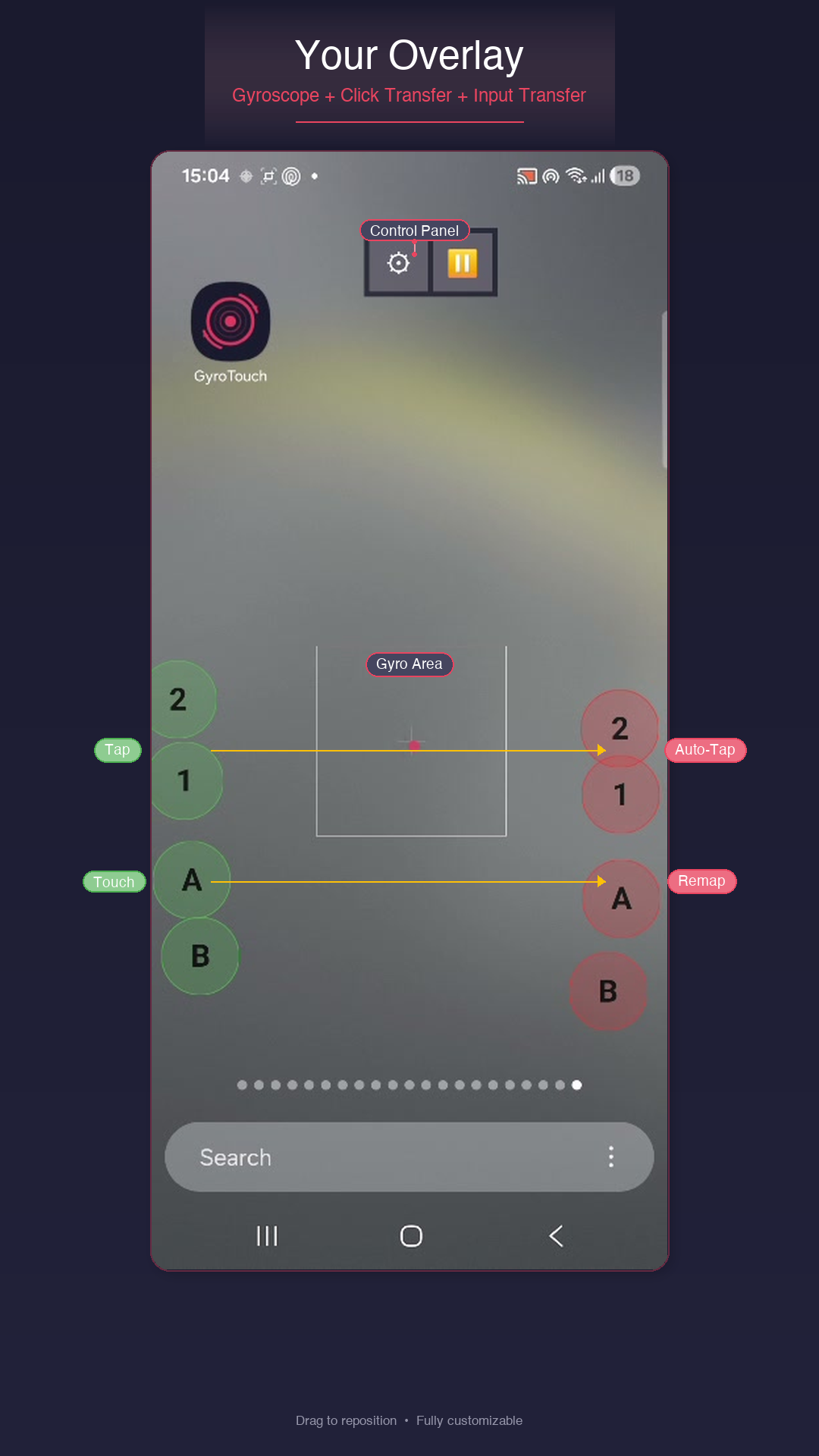
Overlay in Action
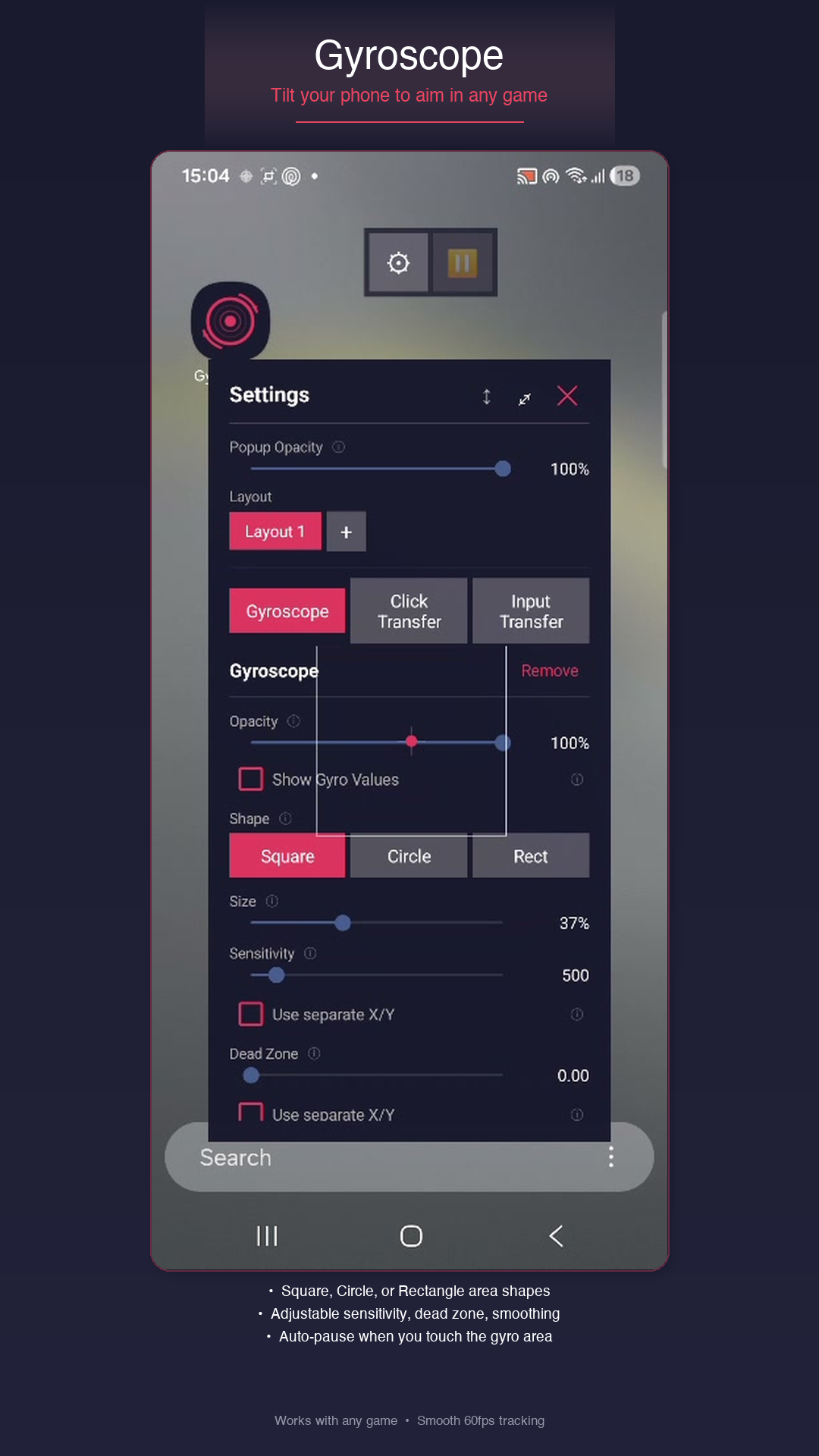
Gyroscope Settings
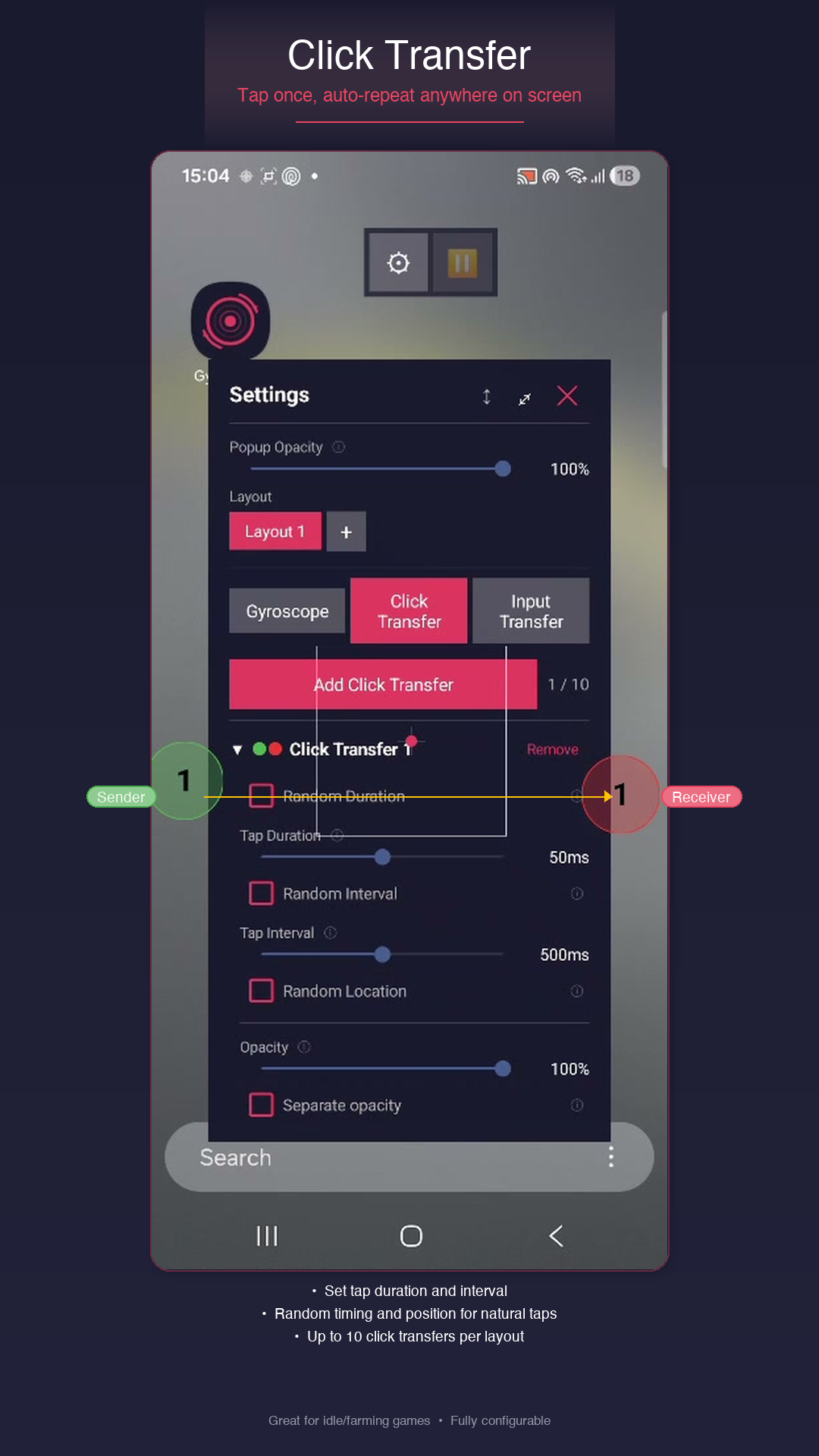
Click Transfer
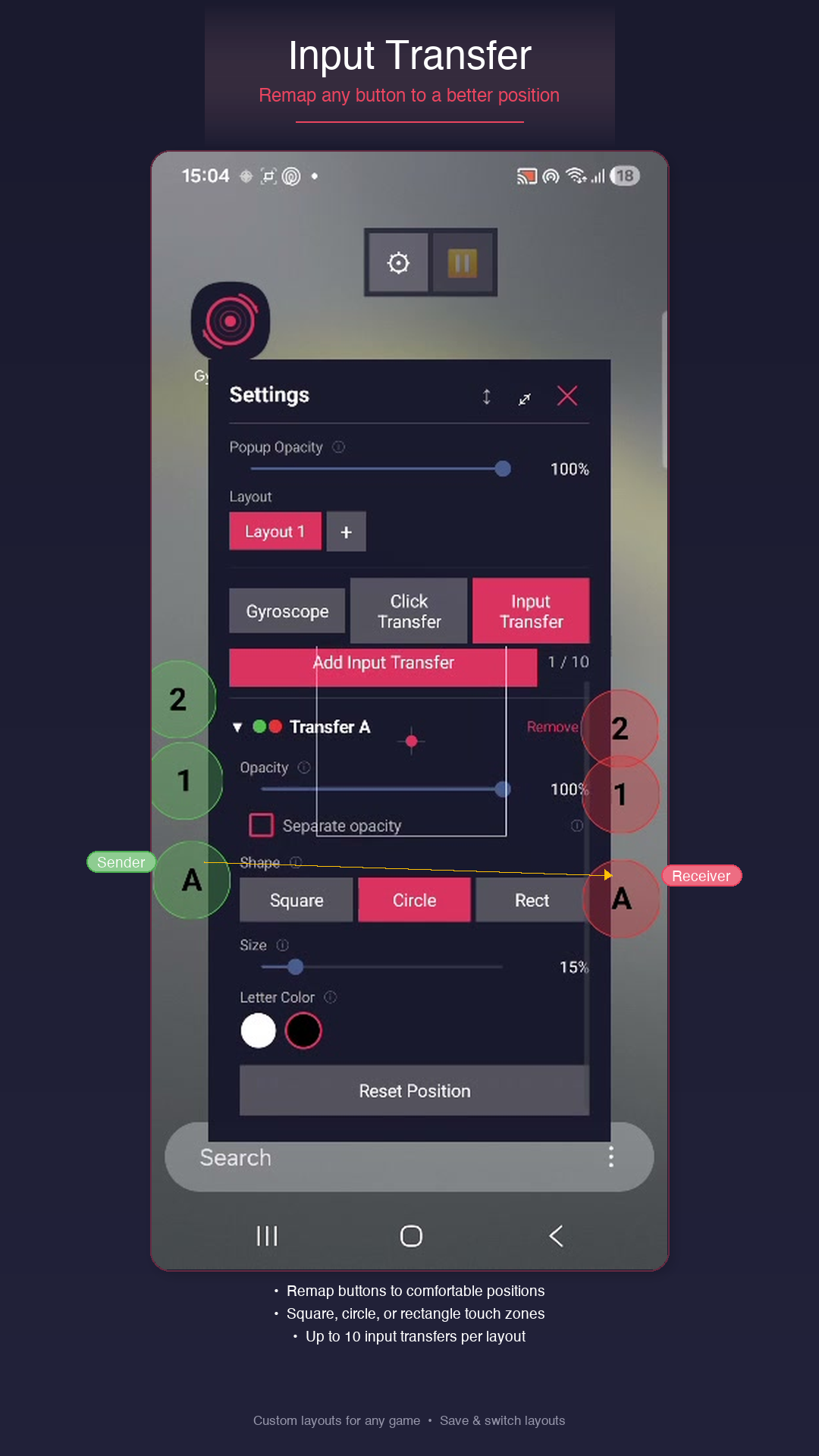
Input Transfer
How It Works
Get started in three simple steps. The entire setup takes about 2 minutes.
Setup
Open GyroTouch and follow the guided wizard. Grant overlay permission and pair via wireless debugging. Brand-specific instructions built in.
Configure
Place the gyro zone, set sensitivity, add click or input transfers. Drag, resize, and customize everything to your preference.
Play
Launch your app. Tilt to control with gyroscope precision while your fingers handle everything else simultaneously.
Get GyroTouch
Download for free and start controlling with precision.
Google Play
Coming soon to Google Play Store
Coming SoonRequires Android 11 or higher · Gyroscope sensor required only for tilt control
Our Vision
GyroTouch was built to bring the precision of gyroscope aiming — standard on Nintendo Switch and PlayStation — to every Android user. No expensive accessories, no root access, no complicated setup. Just tilt and aim.